Thursday, October 14, 2010

Round Corner Plugin

This plugin was mentioned a while back on the Official SketchUp blog, and I hope to cover it here with a bit more specificity.

First, you can get this plugin here. Note that there are TWO downloads - you need to get both. Keep the file structure, and place the files in your SketchUp / Plugins folder.

(The author is the amazing Fredo6, who has several other amazing scripts here.)

Here's the Round Corner toolbar. (If you don't see it, choose View / Toolbars / Round Corner.)


Here's how I used this plugin:

First, I only tried the Round Corner option (the first icon on the toolbar). I'm sure the other two work just as well!

I built a basic box, and clicked Round Corner. The first thing to note is the offset distance and number of segments, which appear in the Offset field, separated by a comma. Keep in mind that high segmentation produces a smoother rounding but makes for higher file size.


I clicked one face, and its four edges highlight in red; the red edges are the ones that will be rounded. The green lines show where the rounding will start.
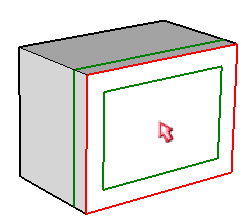

I wanted a larger rounding radius, so I typed 18,6. (These numbers appeared in the Offset field as 18'-6", 6s - the "6" is for segmentation.) Now the green lines are farther from the red borders.


(As always, you never have to click in the Offset field - just type. If you enter only a number, that number will replace the offset distance and the segmentation will remain unchanged. You can also press the Tab key, which invokes a window you can use to enter these values.)

I then clicked another face, which added those edges to those edges selected for rounding.

To start the rounding, just click anywhere in blank space. Here's how mine looks - there are edges everywhere because I have non-hidden edges set for both Borders and Inner Edges.


After undoing, I tried again, selecting the same two faces. This time, however, I'm unselecting the edge between the two faces (you can click a selected edge to unselect it).

Here's the result this time: the unselected edge was not rounded, the edges in the rounded portion are smoothed, and the border edges are unhidden.
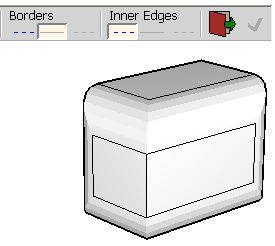

One last time: this time I clicked a vertex to select all edges that end there.

And here are the results with all edges softened:


Here's another example of something you'd want to make round and not sharp edges: a chair. It's created as a set of components: two identical components for the armrests, one component for the body. (If you want to try this, you can download my very sophisticated model here.)


For the armrests, I first opened one of them for editing, then used Round Corner on all its edges. (An easy way to select all edges is to double-click on a face - this selects all contiguous faces.)

Then I did the same for the body.


Here's how you'd use Round Corner on 3D Text: you would either edit or explode the 3D text component, activate Round Corner, and click the top face of each letter:

With this very cool result:


Round Corner is great for adding drafts to mechanical parts. For the model shown below, I want to round the corner between the magenta and yellow obects. So I clicked the top yellow face to select all of its edges . . .


. . . then I clicked each outer edge of the yellow face, to unselect them.

Here's the result - excellent! This would be rather annoying to complete with the Follow Me tool.

This plugin has numerous other options, and all documentation is included. Just go to the main SketchUp main and choose Tools / Fredo6 Collection /Round Corner / Documentation. You'll also find a helpful video, plus a link to donate to support Fredo6. (If this tool ends up saving you hours of modeling time, please toss Fredo6 a few bucks so he can keep writing this stuff!)


Anyone can design anything in 3D! http://www.3dvinci.net/

Email Newsletter icon, E-mail Newsletter icon, Email List icon, E-mail List icon
Join our FREE Email Mailing List!


Wednesday, October 13, 2010

SketchUp in Amharic

Recently I had three wonderful visitors to my house: the Abebe family, shown below.


Left to right are Abanezer, Zelalem (the dad), and Robel. (Mom was working.) The Abebes moved to the DC area a few years from Ethiopia, and have lost no time learning all they can about computers and design.

Robel and Abanezer worked with my friend Phil Shapiro who works as the "Public Geek" at the library in Takoma Park, Maryland (in addition to his teaching work and other mentoring projects). Phil introduced the boys to SketchUp (as well as Inkscape), and once they got comfortable in SketchUp, they created a YouTube screencast in Amharic, showing how to create a house.


Not fluent in Amharic? Don't worry, here's the English version:


The screencasts were created using Screenflow, a screencasting program for the Mac.

These are super-nice kids, and I look forward to staying in touch with them and seeing how their education and careers progress. As a bonus, I also got a quick lesson in written and spoken Amharic, which is a beautiful-sounding language.


Anyone can design anything in 3D! http://www.3dvinci.net/

Email Newsletter icon, E-mail Newsletter icon, Email List icon, E-mail List icon
Join our FREE Email Mailing List!


October Math Forum Project: Pentaflake

I just posted this month's Math Forum project: The Pentaflake. This is a 2D fractal created from just one simple pentagon. The only SketchUp tools needed to complete the pentaflake are Rotate and Erase - simple and elegant.

When you fill in the missing spaces with faces, you can get some beautiful patterns:

As usual, there is a Student Version which includes a few questions, and a Teacher Version that provides the answers.

It's free - check it out!

PS - I ran across the pentaflake while creating the hexaflake shown below, which is the topic of one of this month's Projects of the Month.


Anyone can design anything in 3D! http://www.3dvinci.net/

Email Newsletter icon, E-mail Newsletter icon, Email List icon, E-mail List icon
Join our FREE Email Mailing List!


Thursday, October 7, 2010

What's Coming in Our October Projects?

Next Friday, October 15, here's what subscribers to our Projects of the Month will be getting:

Nearby Models

This project details one of the new features of SketchUp 8. You can bring in a patch of land from Google Earth (without actually opening Google Earth), and then populate that land with 3D Warehouse models that are located nearby. No more back-and-forth between Earth, Warehouse, and SketchUp!


Dice

Learn how to start with a simple cube and add guide lines and "dot" components to make a die (the singular of dice). As a bonus you'll also see how to use a free plug-in to make rounded edges and corners!


Hexaflake

This 2D fractal is created by copying hexagons (or groups of hexagons) into a pattern of seven hexagons (or groups of hexagons).


Sign up for Projects of the Month - still just $36 gets you 3 projects per month for 12 months!


Anyone can design anything in 3D! http://www.3dvinci.net/

Email Newsletter icon, E-mail Newsletter icon, Email List icon, E-mail List icon
Join our FREE Email Mailing List!


Thursday, September 16, 2010

Our Second 6-Month Project Bundle

If you like our Projects of the Month but have missed some months (or just like things in bigger servings), you can get our latest 6-month project bundle (March 2010 - August 2010) for just $25.

(The first six months are here.)

This bundle contains 18 projects (12 in 3D design, 6 in geometry), taking up 226 (!) pages. We send it to directly you as a PDF - no license or software locking. Color graphics, print whatever you need, or just view it on-screen.

Here are a few of the projects included in this bundle:


The full list of contents, and ordering info are on my website. Enjoy!

And keep in mind you can always get each month's set of three projects for just $5.


Anyone can design anything in 3D! http://www.3dvinci.net/

Email Newsletter icon, E-mail Newsletter icon, Email List icon, E-mail List icon
Join our FREE Email Mailing List!


Monday, September 13, 2010

Math Forum Project: Esrefoglu Pattern

Sorry, I took a 3-month summer break from the Math Forum, but now I'm back, ready for some great math projects for the 2010-11 school year. Remember, these projects are FREE and aren't just for math teachers!

September's project is on the Esrefoglu pattern. That's not a typo, it's the name of a mosque in Turkey that features a beautiful pattern based on hexagons. (I learned this pattern from the book Islamic Geometric Patterns by Eric Broug.)

You'll learn how to create one hexagon with all the lines inside it.

That hexagon can be tiled to make lots of interesting patterns.


As always, this project has a Student Version and a Teacher Version (both in PDF format). Try it out!


Anyone can design anything in 3D! http://www.3dvinci.net/

Email Newsletter icon, E-mail Newsletter icon, Email List icon, E-mail List icon
Join our FREE Email Mailing List!


Cool Geometry Videos

A math professor named Debra Borkovitz, who has the entire GeomeTricks set of books, created some YouTube videos showing some geometric concepts using SketchUp.

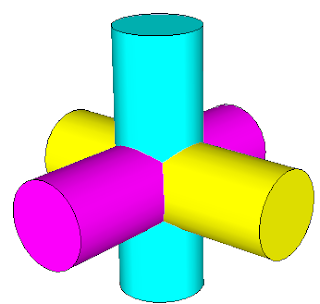
This video shows three intersecting cylinders:


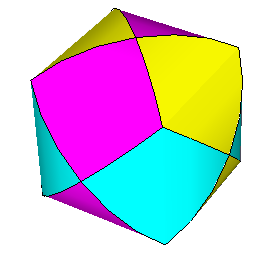
This prompted me to write one of the projects that will be included in the September Projects of the Month, going out in a couple of days. In this project, you find the solid that results from the intersection of two or three cylinders.


The short video below shows how a section plane can slice through a cube. Note: when the plane gets halfway through, the resulting 2D shape is a hexagon.


Section planes have enormous potential in geometric projects, and I plan on writing more about them in the coming months.


Anyone can design anything in 3D! http://www.3dvinci.net/

Email Newsletter icon, E-mail Newsletter icon, Email List icon, E-mail List icon
Join our FREE Email Mailing List!


Tuesday, September 7, 2010

What's Coming in our September Projects?

It's been a long summer, and I'm so glad that school has started (not just because I have 5 kids who NEED to be out of the house!) With a fresh school year in mind, here's what I came up with for our September Projects of the Month:

Photo Montage

Want a great way to show your best summer vacation photos? Bring out your inner Andy Warhol by using SketchUp to transform a single photo into a multi-color montage.


Furniture Arrangements

Imagine you have a room, a few pieces of furniture, and some paintings. But you have a few ideas about where everything should go. By using SketchUp layers and scenes, you can easily see how all of your design ideas look, and can switch between designs with just a click.


Intersecting Cylinders

Take two or three perpendicular, intersecting cylinders - can you guess what the intersection solid looks like? Imagine no more - SketchUp makes it easy to find this shape.


At still just $36 for the year (3 projects per month for 12 months), sign up at Projects of the Month.


Anyone can design anything in 3D! http://www.3dvinci.net/

Email Newsletter icon, E-mail Newsletter icon, Email List icon, E-mail List icon
Join our FREE Email Mailing List!


Monday, September 6, 2010

Le SketchUp

At last week's 3D Basecamp in Boulder, we were treated to the world premier of French architect "Corbusier"'s latest video. Accompanied by the usual red carpet, celebrities, etc. If you're French, please don't be offended.


Indeed, zere is no excuse for not using ze LayOut. No more dinosaurs!

That video is by the guys at Viewsion, SketchUp's Irish training center. Here's an earlier offering, equally funny:


"Corb" was last spotted relaxing at the SketchUp party last Thursday in the Google office:


Paul Lee (above, see the resemblance?) has also put together some training course material in SketchUp / LayOut for construction documents. I'll be posting more on that in the near future.


Anyone can design anything in 3D! http://www.3dvinci.net/

Email Newsletter icon, E-mail Newsletter icon, Email List icon, E-mail List icon
Join our FREE Email Mailing List!


Saturday, September 4, 2010

Competition: 3D Printed Lamp

I can't believe I've been neglecting this blog for almost a month - sorry about that! August was a little crazy with a bit of traveling and little child care. But I have a ton of things to write about, including tidbits from last week's SketchUp user conference.

But for now, check out this cool design competition from 3D printer company i.materlialise, in which you can design a 3D lamp. Here's an example:


Anyone can design anything in 3D! http://www.3dvinci.net/

Email Newsletter icon, E-mail Newsletter icon, Email List icon, E-mail List icon
Join our FREE Email Mailing List!


Sunday, August 8, 2010

What's Coming in Our August Projects?

I know that the dog days of August is not the best time to introduce anything new and academic, but school is right around the corner, and you know you can use some new project ideas. Here's what you'll get if you're a subscriber to our Projects of the Month:

Castle Turret

We had a project back in May which showed how to use the Follow Me tool to create round chess pieces. This prompted a few subscribers to ask how to create pieces with cutouts, such as a chess castle. So this project shows how it's done, using the Intersect with Model tool and cutting shapes.


Iron Fence

This is a very cool project, in which you start with just a rectangle with a few lines in it, and use mirrored copies to create a beautiful, symmetric fence complete with a frame.


Text as Graphics

SketchUp has a 3D Text tool which enables you to create words on a wall, but too many words and characters will really mushroom your file size. A better way to add lots of text is to use a graphic instead.


The yearly subscription is still just $36 for 36 projects (3 per month), so what are you waiting for? Sign up: Projects of the Month!


Anyone can design anything in 3D! http://www.3dvinci.net/

Email Newsletter icon, E-mail Newsletter icon, Email List icon, E-mail List icon
Join our FREE Email Mailing List!