Sunday, March 6, 2011

What's Coming in Our March Projects?

The three projects this month range from the practical to the whimsical and rather impractical. All of them are fun, naturally! If you're not a subscriber, it's just $36 for a year's worth of projects: 3 per month for 12 months. Sign up here.

Spaceship to Mars

Based on a SketchUp model and animation by math teacher Guzman Tierno, this project shows how to "fake" an animation of a spaceship orbiting a planet, by adding in a background image and setting up a few scenes.


Here's the animation I made:


Furnishing a House

A question I hear all the time is "how do I get furniture inside this house?"

It's pretty easy when you know how to use section planes.

String Cube

This geometry project looks like 3D string art - one of those projects where you run string between pegs. But it's just a big set of SketchUp edges.


Once again, here's where you can get the Projects of the Month. Enjoy!

Anyone can design anything in 3D! http://www.3dvinci.net/

Email Newsletter icon, E-mail Newsletter icon, Email List icon, E-mail List icon
Join our FREE Email Mailing List!


Wednesday, March 2, 2011

Spaceship Animation

Two posts down I showed what teacher Guzman Tierno did with a rocket model created from a student's drawing. I loved his animation of the rocket "flying" through space, so I use this idea for one of this month's Projects of the Month.

I found a spaceship model in the 3D Warehouse and an outer space picture from Google Images. The rest is done with styles and scenes. Here's my animation:


Check back in about a week to see the other two projects!


Anyone can design anything in 3D! http://www.3dvinci.net/

Email Newsletter icon, E-mail Newsletter icon, Email List icon, E-mail List icon
Join our FREE Email Mailing List!


Tuesday, March 1, 2011

New Book on LayOut 3

Today I'm releasing my updated book on LayOut: Google SketchUp 8 Hands-On: LayOut 3.


As most of you know, LayOut is a presentation tool included with SketchUp Pro. You can insert SketchUp models into LayOut, and use labels, text, dimensions, and all sorts of 2D drawing tools to present all the wonderful features of your model. But LayOut can do much more than that, and this book uncovers all of LayOut's useful features.

This new book is available in PDF and color-printed formats. We skipped the black and white version for this book, since color and materials plays a large role in the exercises.


Anyone can design anything in 3D! http://www.3dvinci.net/

Email Newsletter icon, E-mail Newsletter icon, Email List icon, E-mail List icon
Join our FREE Email Mailing List!


Wednesday, February 9, 2011

Traveling Through Space in SketchUp

I've posted about Guzman Tierno before - he's a middle school math teacher in Italy who does amazing things with his students in SketchUp. Last May, I posted his video of the SketchUp-modeled battle of Troy - you HAVE to see it. He's very into Sketchy Physics, and created a cool (and slightly disturbing) video of a 24-vehicle mashup.

This time it's something short and sweet - a model of spaceship, created from an 11-year old student's hand drawing, in an animation that looks like it's flying through space.


The spaceship itself was "painted" using Photo Match, and the animation was created using scenes. The background image is simply a watermark, which is defined as part of a SketchUp style. I'm going to show how it's done in one of March's Projects of the Month.

What a great way to combine technology with hand-made creativity! If all teachers were like Guzman, we'd be graduating many more future engineers and builders...

If you want to poke around the actual SketchUp model and see how this was done, click the image below to open the model's 3D Warehouse page.


Anyone can design anything in 3D! http://www.3dvinci.net/

Email Newsletter icon, E-mail Newsletter icon, Email List icon, E-mail List icon
Join our FREE Email Mailing List!


Tuesday, February 8, 2011

Rhombic Hexacontahedron

This thing with the complicated-sounded name is a 60-sided, stellated shape, in which each face is an identical rhombus.

I mentioned this solid in a previoust post, after a teacher from Taiwan pointed me toward some excellent geometric models he created.

I love a math challenge, so I wrote up a free project to show how this thing is made.

So..... if you're pretty comfortable with SketchUp's Rotate too, and you aren't scared of working with groups and components, you too can create a rhombic hexacontahedron. And here's a twist: you can paint each of the rhombic solids that comprise this solid so that no color repeats around any vertex. Each vertex is surrounded by five rhombic solids, so you only need to use five colors.

Want to try it? It's my latest project on the Math Forum (free PDF download). As usual, I've posted a Teacher Version with some extra notes and comments, and a Student Version.

Enjoy!


Anyone can design anything in 3D! http://www.3dvinci.net/

Email Newsletter icon, E-mail Newsletter icon, Email List icon, E-mail List icon
Join our FREE Email Mailing List!


Monday, February 7, 2011

What's Coming in Our February Projects?

Subscribers to our Projects of the Month will learn how to make some excellent SketchUp models this month. Going out on February 15 are these projects:

Hot Air Balloon


To make this model, you start with a 2D shape made from tangent arcs. To get the stripes, you'll make use of hidden geometry, a feature many SketchUp users don't know about!


Mandala Pattern

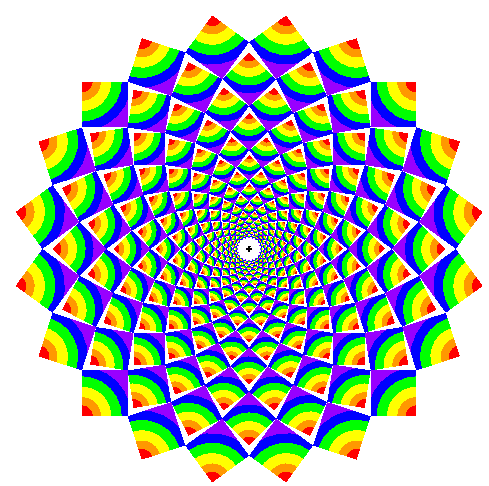
There are many patterns that fall under the "Mandala" description, but this is one of the most beautiful:


You start with just one polygon, and take advantage of groups and components to get all of the shapes to be the exact size needed to fit rings inside of rings inside of rings.

Once you get the basic method down, you can apply it to other starter polygons.


Camping Tent

This project uses one of SketchUp's Sandbox tools - which are not just for terrain modeling. With a few 3D curves, you can make all sorts of organic shapes.


To subscribe to our Projects of the Month still costs $36 for 36 projects over 12 months. How else can you get so much brain candy for so little money?


Anyone can design anything in 3D! http://www.3dvinci.net/

Email Newsletter icon, E-mail Newsletter icon, Email List icon, E-mail List icon
Join our FREE Email Mailing List!


Wednesday, January 26, 2011

Cool 3D Solids

I've been emailing over the last few days with a high school math teacher in Taiwan. Ho-Kai Chen, who also goes by the nickname "Joe," teaches at Jing-Ho High School, and works with 3D geometry on the computer using free software such as SketchUp (of course) and GeoGebra.

Here are two fantastic models Joe has built and uploaded to the 3D Warehouse:

Cube-10 Compound (click the "3D" button to spin and zoom the model, click the "Google 3D Warehouse" button to link to the Warehouse where you can download the model).


BTW, my book "Golden Rectangle Solids" shows how to make several cube compounds like this one.

And the next one: Rhombic Hexacontahedron (quite a mouthful!).


This model can be created from an icosahedron, and I'll be featuring the how-to in an upcoming Math Forum project (free!). As an added twist, you can color the solid rhombs using 5 different colors, so that no color is repeated at any vertex:


It's complicated, but really cool and fun (at least for me!)

Anyone can design anything in 3D! http://www.3dvinci.net/

Email Newsletter icon, E-mail Newsletter icon, Email List icon, E-mail List icon
Join our FREE Email Mailing List!


Tuesday, January 18, 2011

What Would You Make from a Geodesic Dome?

Math teacher Willy Felton (featured here before), has done it again. One of my Projects of the Month last year showed how to make a geodesic dome:


Willy used this model is a basis for a 5-day geometry project. Not only did students make the domes themselves, but they had to use them creatively in a larger model.

Here's a video of the class's best models (my favorite is the Zombie Defense Compound):


I was wondering about the fireball-looking models used in one of the scenes (Superman vs comets), and those came from the 3D Warehouse, from a search for "explosion." It's a very neat model which will probably one of next month's projects.

Great work!


Anyone can design anything in 3D! http://www.3dvinci.net/

Email Newsletter icon, E-mail Newsletter icon, Email List icon, E-mail List icon
Join our FREE Email Mailing List!


Sunday, January 9, 2011

What's Coming in Our January Projects?

In between all of the updating I've been doing on my SketchUp books for Version 8, I wrote up the projects for our Projects of the Month subscribers. This month has awesome stuff:

Shark Tower!

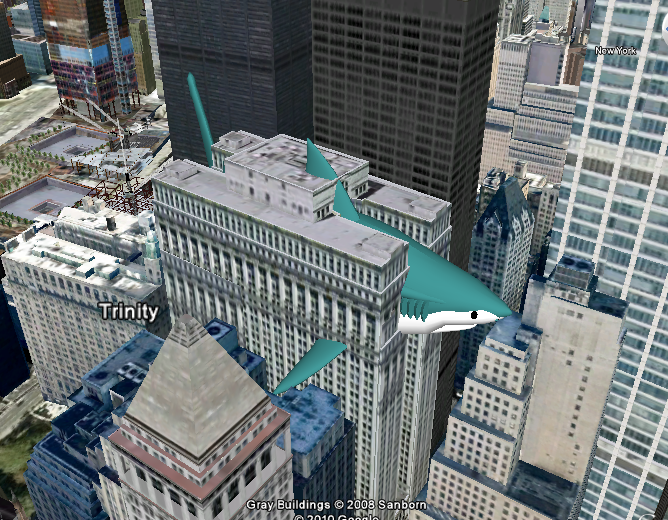
The new SketchUp 8 interface with Google Earth makes it easy to put whatever you want wherever you want. Such as a giant shark sticking out of a "real" building:


Dragon Curve

This famous fractal looks complex, but you can create it pretty easily starting with just a single line, over many iterations of rotated copies. You'll look like a math genius!


Good Ol' Number 2 Pencil

(Well it can be a pencil of any number.) While this looks like a pretty basic object, there is actually some complexity around the bottom of the pencil. This project will show the tricks you can use to quickly make this model:


Our yearly subscription is still just $36, which gets you 3 projects each month for 12 months. You can't beat it! Sign up here.


Anyone can design anything in 3D! http://www.3dvinci.net/

Email Newsletter icon, E-mail Newsletter icon, Email List icon, E-mail List icon
Join our FREE Email Mailing List!


Monday, January 3, 2011

New SketchUp 8 Books!

Sorry I've been remiss in my blogging duties, but I have a good excuse - I've been VERY busy the last couple of months.

If you're on my mailing list you already know, but just before New Year's I put the finishing touches on my tutorial books for SketchUp 8. Here are the covers (created using Kerkythea for rendering, pretty nice, eh?):


The new features covered are how SketchUp interacts with Google Earth, including the new Street View and Building Maker capabilities. And I've added a whole chapter on third-party resources: plugins, tutorials, materials, rendering applications, etc.

The Student Coursebook is also updated - if you're an instructor contact me for an evaluation PDF copy.

If you already have my SketchUp 7 books, stay tuned for the Delta book, covering only what's new, hopefully within a week or so.


Anyone can design anything in 3D! http://www.3dvinci.net/

Email Newsletter icon, E-mail Newsletter icon, Email List icon, E-mail List icon
Join our FREE Email Mailing List!


Tuesday, December 7, 2010

What's Coming in Our December Projects?

Worried that you or your kids will be twiddling their thumbs over winter break? If you're a subscriber to our Projects of the Month, you'll get some great ideas for fun winter projects!

Here's what's coming out on December 15:

Chicken Soup!

It's cold here in DC, and I've been in the mood for some hot soup. With just a digital picture and a few SketchUp tools (including Follow Me and Intersect Faces), you can make a very appetizing model:


Warm Colors, Cold Colors

This is a project my own kids have spent hours doing. You make a grid, add some text, and use two sets of colors to paint the letters and background. There are endless ways to get creative with this basic concept.


Hexagonal Pyramid

On the Math Forum, I posted a project about ways to create a hexagonal pyramid in 3D. This project creates the same pyramid, but starts with the "net" - the 2D, unfolded faces.


How far do you need to rotate the triangle above so that its tip will be in the right place? This project will show you the geometric trip to get that angle just right.

Our subscription is still just $36 for the year - that's 36 projects for $1 each! A no-brainer, really. Sign up at Projects of the Month.


Anyone can design anything in 3D! http://www.3dvinci.net/

Email Newsletter icon, E-mail Newsletter icon, Email List icon, E-mail List icon
Join our FREE Email Mailing List!


Wednesday, November 24, 2010

Instant Roof is AWESOME

I have a whole chapter about creating roofs in my Basic Exercises book, focusing mainly on using directional and geometric constraints while drawing. And while these are still great exercises for learning the concepts of constraints, there's a new plugin that can save you hours of work.

I've seen a lot of buzz about Instant Roof, a plugin by Chuck Vali of Vali Architects. So today I had a chance to try it out - I downloaded the free version which is itself simply amazing.

As with most plugins, download the RBS file and place it in your Plugins folder inside the SketchUp installation.

I started with this building, which would be rather a pain to put a roof on manually:
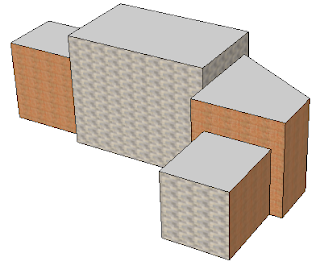

I selected the four flat top faces:
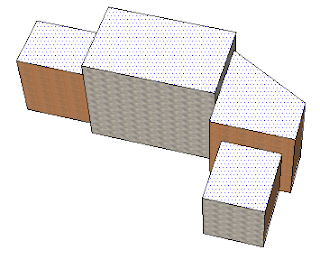
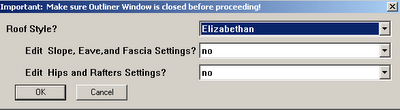
Then I chose Plugins/ Instant Roof / Make Roof. There are a few styles to choose from; I picked Elizabethan. You can edit the default slopes, fascias, etc, but I kept the style as is. (You also have the option to save your own roof styles. And roof styles are not to be confused with SketchUp's display styles!)


After clicking OK, here's the roof, which took about 1 second.
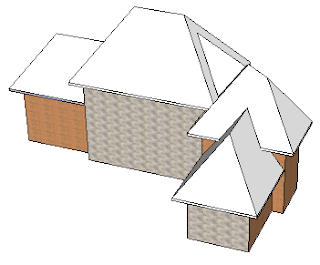
Each corner is handled perfectly, including the complex ones.
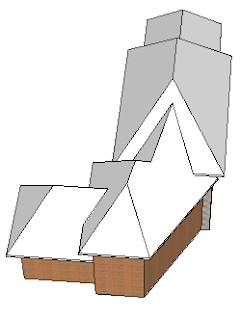
The default roof is hipped - sloped uniformly against all edges. But I wanted gables along front edges, so I used Undo to get rid of the roof I just made.

This time, not only did I select the top flat faces, I also selected the edges above which I wanted a gable.
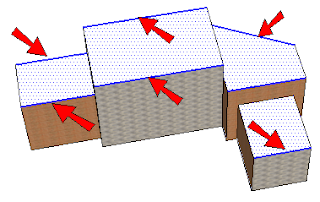
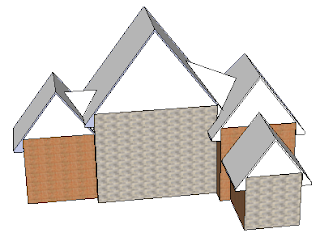
Running Instant Roof with the same Elizabethan style produced this:
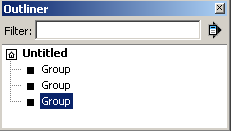
One thing I didn't see in any of the other write-ups was the face that several groups (not just one) are produced by Instant Roof, which you can see if you open the Outliner. (The Outliner needs to be CLOSED before running Instant Roof, however!)


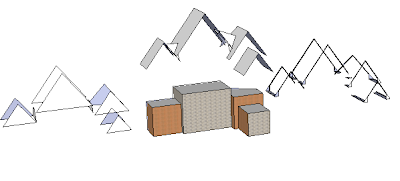
Here are my three groups, in an exploded view:
Instant Roof doesn't stop there - it also enables you to add details and materials. Something to keep in mind if you want to add a material: that material needs to be added somewhere inside your model. Instant Roof won't search in your material libraries!

I wanted to add detail to the roof itself, so I opened that group for editing and selected all faces. (You can select only certain faces if you want different details).
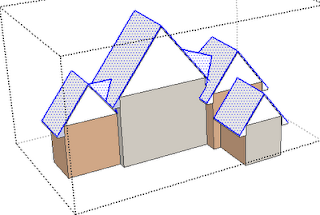

Then I chose Plugins/ Instant Roof / Add Roof Details. I went with Mission Tiles with Materials.



The first step is applying the tiles themselves, which took maybe 20 seconds.
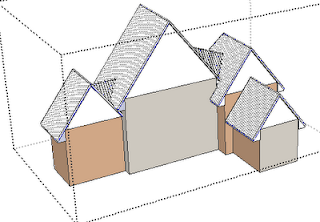
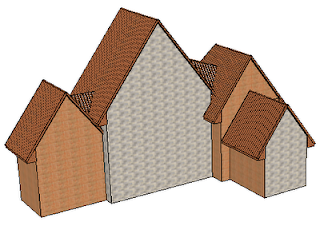
I was then asked which material, and the drop-down menu included all materials in my model. Beautiful results!
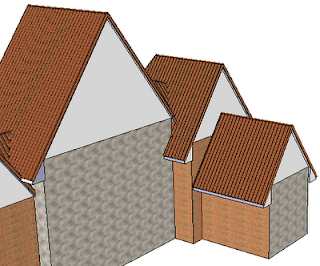

I then exploded the group that included the vertical roof faces, erased the dividing lines, and got seamless walls.
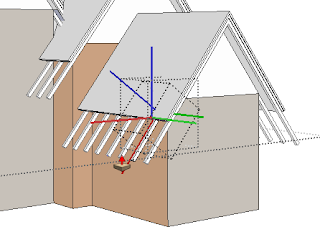
Here's something else neat: I tried the Ski Lodge style, and get a roof with rafters. The rafters are contained in their own group, and each identical rafter is a component. So can edit one rafter, extend or shorten it, and they all update. Love love love it!


So you can do all this with the Free version, but the Pro version (a steal at $39!) offers more styles, more customization options, etc.

Again, download this plugin here: Instant Roof. Vali's website also has detailed videos and very detailed PDF instructions.


Anyone can design anything in 3D! http://www.3dvinci.net/

Email Newsletter icon, E-mail Newsletter icon, Email List icon, E-mail List icon
Join our FREE Email Mailing List!