A couple days ago I posted a short video on finding and playing tours of 3D buildings in Google Earth. Oops, I hadn't upgraded to Google Earth 5, but now I have, and I've created an updated video:
You can find the Google Earth tours here. Not all are created by Google, but they're all quite cool. The underwater tour is especially nifty.
Anyone can create anything in 3D! www.3dvinci.net
Friday, June 5, 2009
Thursday, June 4, 2009
#1 CAD book! (for now)
I often poke into Amazon to see how my Cookbook is doing, and the sales ratings are usually all over the place. But today, for the first time that I've noticed, it hit #1 in one of its categories (CAD). Not too bad in the other categories either!
The ratings change by the minute, so I took a screen cap for posterity. (Though I'll check tomorrow and the numbers will probably be well into double digits ;-)

Anyone can design anything in 3D! www.3dvinci.net
The ratings change by the minute, so I took a screen cap for posterity. (Though I'll check tomorrow and the numbers will probably be well into double digits ;-)

Anyone can design anything in 3D! www.3dvinci.net


Tuesday, June 2, 2009
Getting into Twitter
I signed up for it a while ago, and was happy with my three followers for about half a year. But everyone seems to think Twitter is THE way to get info and stay in touch with those who are interested in what you do. So follow me, and I'll follow you! I'm at http://twitter.com/bonnieroskes.
Anyone can design anything in 3D! www.3dvinci.net
Anyone can design anything in 3D! www.3dvinci.net
Monday, June 1, 2009
New Video: Tours in Google Earth
The Google Earth Gallery has a lot of tours you can look at: some are single models, some have cool animations, etc. The latest interesting thing I've found is "guided tours" of certain types of models around the world: bridges, cathedrals, castles, etc.
I particularly like the AIA Tour, which contains a few architecturally interesting models in America. So since I spent all that money on Camtasia Studio, I made a short video on how to use these tours. Enjoy!
These tours are KML files, and they are actually pretty easy to create. Maybe my next video will show you how...
Anyone can create anything in 3D! www.3dvinci.net
I particularly like the AIA Tour, which contains a few architecturally interesting models in America. So since I spent all that money on Camtasia Studio, I made a short video on how to use these tours. Enjoy!
These tours are KML files, and they are actually pretty easy to create. Maybe my next video will show you how...
Anyone can create anything in 3D! www.3dvinci.net
Can't Get to Disney World Right Now?
Then at least you can get there virtually!
I read about this on the official SketchUp blog: Disney has placed all of their parks, attractions, and resorts in Google Earth. So I tried playing with it and found that a little extra explanation is required, but it is WAY cool.
In Google Earth, make sure the 3D Buildings layer is turned on. Then find the Walt Disney World Resort layer, which is located inside Gallery / Travel and Tourism. (There is also a layer for Disneyland Paris.)
When you fly to Disney World (the one in Orland), you'll see color-coded mouse ears:

Clicking on a pair of ears will open an interactive window with info on the attraction. I also found that sometimes when I double-click on the ears, I fly to the model itself (as long as I'm not looking straight down, and I'm zoomed in a bit). But for some reason, double-clicking doesn't always work. If you can't get it to work, here's a roundabout way to fly to a specific spot: right-click on the mouse ears and save the location to "My Places." Then you can find that place on the left pane, under "Places," and double-click the place name.
But what's really amazing about the Disney layer is the excruciating detail. There must be some SketchUp modelers out there who must have double vision from their painstaking work modeling all of those trees, rocks, and benches! For example, here's Primeval Whirl roller coaster in Animal Kingdom:

Every structural and decorative piece of this roller coaster is there, and it's surrounded by accurate, 3D trees. It's hard to imagine the work that went into this!
Anyone can design anything in 3D! www.3dvinci.net
I read about this on the official SketchUp blog: Disney has placed all of their parks, attractions, and resorts in Google Earth. So I tried playing with it and found that a little extra explanation is required, but it is WAY cool.
In Google Earth, make sure the 3D Buildings layer is turned on. Then find the Walt Disney World Resort layer, which is located inside Gallery / Travel and Tourism. (There is also a layer for Disneyland Paris.)
When you fly to Disney World (the one in Orland), you'll see color-coded mouse ears:

Clicking on a pair of ears will open an interactive window with info on the attraction. I also found that sometimes when I double-click on the ears, I fly to the model itself (as long as I'm not looking straight down, and I'm zoomed in a bit). But for some reason, double-clicking doesn't always work. If you can't get it to work, here's a roundabout way to fly to a specific spot: right-click on the mouse ears and save the location to "My Places." Then you can find that place on the left pane, under "Places," and double-click the place name.
But what's really amazing about the Disney layer is the excruciating detail. There must be some SketchUp modelers out there who must have double vision from their painstaking work modeling all of those trees, rocks, and benches! For example, here's Primeval Whirl roller coaster in Animal Kingdom:

Every structural and decorative piece of this roller coaster is there, and it's surrounded by accurate, 3D trees. It's hard to imagine the work that went into this!
Anyone can design anything in 3D! www.3dvinci.net
Thursday, May 28, 2009
My Webcast is Up!
I did a live webcast on May 14 for O'Reilly, based on material in my book The Google SketchUp Cookbook. The focus was mostly on presentation: styles, scenes, layers, and sectioning.
If you didn't see it live on the 14th, you can see the recording now.
For a bigger version, go to O'Reilly's site.
While you're watching, keep in mind that O'Reilly had just installed a new version of WebEx, the conferencing software they use for webcasts. And for some reason, I got kicked out of the webcast three or four times at the very beginning, though the first few minutes aren't part of the recording. It happens about 4 minutes in, and I come back after a minute or so. Also, the recording itself is a little choppy - it was smoother on my machine during the recording. I guess this is function of WebEx's recording settings.
The feedback was great, so maybe they'll have we do another one soon! It was quite fun.
Anyway, enjoy!
Anyone can design anything in 3D! www.3dvinci.net
If you didn't see it live on the 14th, you can see the recording now.
For a bigger version, go to O'Reilly's site.
While you're watching, keep in mind that O'Reilly had just installed a new version of WebEx, the conferencing software they use for webcasts. And for some reason, I got kicked out of the webcast three or four times at the very beginning, though the first few minutes aren't part of the recording. It happens about 4 minutes in, and I come back after a minute or so. Also, the recording itself is a little choppy - it was smoother on my machine during the recording. I guess this is function of WebEx's recording settings.
The feedback was great, so maybe they'll have we do another one soon! It was quite fun.
Anyway, enjoy!
Anyone can design anything in 3D! www.3dvinci.net
Wednesday, May 20, 2009
Making it Harder to Get Away with Murder
I found this interesting article about how prosecutors are using SketchUp and Google Earth in courtroom trials. These applications can be used to recreate a crime scene, and jurors can be walked through the events. The picture below is from the article - if you look closely you can see SketchUp models on both monitors.

SketchUp has been used for years in the film and stage industry, in set designs and storyboarding. Reenacting a crime is just an extension of this. Very cool.
Anyone can design anything in 3D! www.3dvinci.net

SketchUp has been used for years in the film and stage industry, in set designs and storyboarding. Reenacting a crime is just an extension of this. Very cool.
Anyone can design anything in 3D! www.3dvinci.net
Friday, May 15, 2009
New SketchUp Geometry Videos
In my blog post from yesterday (the one right after this one) I mentioned that I created a bunch of new videos, showing how SketchUp can be used for 2D and 3D geometry. These videos were based on the material we presented at NCTM, which made 400 math teachers ooh and aah.
Yesterday I placed all seven videos on YouTube. One of these videos can be seen in yesterday's post, and here's one more as a teaser:
Go watch all of them, and send them to any math teachers you may know!
Anyone can design anything in 3D! www.3dvinci.net
Yesterday I placed all seven videos on YouTube. One of these videos can be seen in yesterday's post, and here's one more as a teaser:
Go watch all of them, and send them to any math teachers you may know!
Anyone can design anything in 3D! www.3dvinci.net
Thursday, May 14, 2009
Vote for Me on Mindbite!
So I heard about this video tutorial contest, and I had already created a bunch of math project videos for YouTube (not there yet, I'll let you know), so I thought why not enter (it's free!)
Here's my video:
Most of these tutorials have to do with software, including a bunch on Camtasia (which I love). But there's nothing else on 3D modeling, so go vote for me and make me $1,000 richer. I promise to split the winnings with all of you.
And while you're there, find out if Your Momma is Talkin' Smack.
Anyone can design anything in 3D! www.3dvinci.net
Here's my video:
Most of these tutorials have to do with software, including a bunch on Camtasia (which I love). But there's nothing else on 3D modeling, so go vote for me and make me $1,000 richer. I promise to split the winnings with all of you.
And while you're there, find out if Your Momma is Talkin' Smack.
Anyone can design anything in 3D! www.3dvinci.net
Wednesday, May 13, 2009
Suessian SketchUp
If you think that SketchUp can only be used to create "straight" geometry (boxes, cylinders, nothing particularly organic or wacky looking), check out these two Dr. Suess-like models I found in the 3D Warehouse. Clicking on the graphic takes you to the Warehouse page where you can download the model.
and
(The model above has shadows turned on, which looks very neat but you can get your model to mode faster if you choose View / Shadows to turn shadows off.)
Fun Stuff!
Anyone can design anything in 3D! www.3dvinci.net
and
(The model above has shadows turned on, which looks very neat but you can get your model to mode faster if you choose View / Shadows to turn shadows off.)
Fun Stuff!
Anyone can design anything in 3D! www.3dvinci.net
Tuesday, May 12, 2009
Got an Hour to Spare?
I'm doing a free, 60-minute webcast for my O'Reilly book, The Google SketchUp Cookbook, this Thursday May 14, at 1 PM EST. The focus will be mostly on presentation: using scenes, styles, and layers. I don't know how many more folks can sign up, but here's the URL:
http://www.oreillynet.com/pub/e/1333
If you miss it, you should be able to access it for a while on the webcast archive (scroll down on that page). I'm not sure how long it'll stay there. Check out the other webcasts on this page - there's some great stuff!
Anyone can design anything in 3D! www.3dvinci.net
http://www.oreillynet.com/pub/e/1333
If you miss it, you should be able to access it for a while on the webcast archive (scroll down on that page). I'm not sure how long it'll stay there. Check out the other webcasts on this page - there's some great stuff!
Anyone can design anything in 3D! www.3dvinci.net
Monday, May 4, 2009
SketchUp and Art
I received an email from an art instructor in Holland, with examples of some of his students' work using SketchUp. Here's one that's simple, elegant, and beautiful: a perfect example of how easy it is to use SketchUp for producing art.
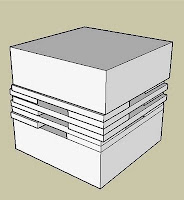
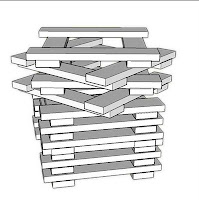
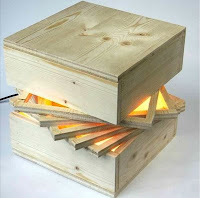
The artist is a high school student. I used Google Translate to translate her Dutch into English, and here's what I got (edited a little by me):
Anyone can create anything in 3D! www.3dvinci.net


The artist is a high school student. I used Google Translate to translate her Dutch into English, and here's what I got (edited a little by me):
"I had the idea to do something with a cube. I started experimenting with Google SketchUp, and repeated several ideas. The idea that I ultimately carried out is as follows: I divided a cube into 3 parts: top, bottom and center. The top and bottom are equal to each other. The middle section consists of 5 squares that are stacked. The squares rotate to create gaps, which are highlighted by the lamp in the middle of the cube."
Anyone can create anything in 3D! www.3dvinci.net
Wednesday, April 29, 2009
NCTM Again
Here's a picture taken from someone in the back of our 450-person room last week, during our talk at NCTM. Sorry about the quality - apparently it was a cellphone camera ;-) Next time we'll get someone to take a professional video.
 All of the slides, handouts, and SketchUp models used in our talk can be found on Jon Choate's website.
I've also placed all of the Sketchup models in Google's 3D Warehouse. These models have scenes you can click to progress through each model.
Anyone can design anything in 3D! www.3dvinci.net
 All of the slides, handouts, and SketchUp models used in our talk can be found on Jon Choate's website.
I've also placed all of the Sketchup models in Google's 3D Warehouse. These models have scenes you can click to progress through each model.
Anyone can design anything in 3D! www.3dvinci.net
Tuesday, April 28, 2009
Math Teachers Love This Stuff
Last week was the annual meeting of NCTM (National Council of Teachers of Mathematics) here in Washington, DC. I gave a talk with Jon Choate (geometry teacher, author, overall genius) entitled "Exploring 3D Geometry with Google SketchUp 7." Our room could accommodate 450 but we expected maybe 100-150 to show up. Twenty minutes before we began, the room was almost entirely full, and was completely full when we got started. (Fabulous turnout, but we ran out of handouts!)
By all accounts, the talk was a huge success. Most of the teachers hadn't seen SketchUp before, and there were audible "oohs" and "ahhs" when we showed how to make Hirschhorn tilings, icosahedrons, cuboctahedrons, etc. Here's one example we showed, demonstrating how section planes and a cone can be combined to show various 2D conic sections:
Click the image below to find this conic section SketchUp model in the 3D Warehouse:
I've placed all of the model used in our NCTM talk in the 3D Warehouse; click here to see the entire collection. Most of these models have scene tabs across the top, which you can click to see the progression of the model. Enjoy!
Anyone can create anything in 3D! www.3dvinci.net
By all accounts, the talk was a huge success. Most of the teachers hadn't seen SketchUp before, and there were audible "oohs" and "ahhs" when we showed how to make Hirschhorn tilings, icosahedrons, cuboctahedrons, etc. Here's one example we showed, demonstrating how section planes and a cone can be combined to show various 2D conic sections:
Click the image below to find this conic section SketchUp model in the 3D Warehouse:
I've placed all of the model used in our NCTM talk in the 3D Warehouse; click here to see the entire collection. Most of these models have scene tabs across the top, which you can click to see the progression of the model. Enjoy!
Anyone can create anything in 3D! www.3dvinci.net
Friday, April 24, 2009
SketchUp Scenes in Google Earth
Scenes in SketchUp can be used for many things, but they're most commonly used to save camera views. If you have two or more scenes, you can create an animation.
I recently mentioned that SketchUp scenes also appear in Google Earth (see this post) - something I can't believe I didn't know about before (hey, nobody's perfect). This week, AECBytes published my article on this topic. For this article, I created a building in Washington, DC, made a few scenes relative to existing landmarks, and imported the model into Google Earth. This video (no audio, don't adjust your speakers) shows what's it all about:
If you give this a try yourself, and create an interesting tour in Google Earth, please let me know (bonnie@3dvinci.net). I'd love to post a few examples of what others come up with!
Anyone can design anything in 3D! www.3dvinci.net
I recently mentioned that SketchUp scenes also appear in Google Earth (see this post) - something I can't believe I didn't know about before (hey, nobody's perfect). This week, AECBytes published my article on this topic. For this article, I created a building in Washington, DC, made a few scenes relative to existing landmarks, and imported the model into Google Earth. This video (no audio, don't adjust your speakers) shows what's it all about:
If you give this a try yourself, and create an interesting tour in Google Earth, please let me know (bonnie@3dvinci.net). I'd love to post a few examples of what others come up with!
Anyone can design anything in 3D! www.3dvinci.net
Wednesday, April 22, 2009
Tesselations
I created a new screencast today, demonstrating that you can tessellate any shape that has either three or four sides (a.k.a. triangles and quadrilaterals). At the end of the video, you'll also see some cool patterns you can make using irregular pentagons and hexagons.
I'll be presenting some of this stuff to a room full of math teachers tomorrow at the Annual Meeting of National Conference of Teachers of Mathematics (or NCTM). SketchUp is a fabulous tool for teaching 2D and 3D geometry in school, but not nearly enough educators know about it.
The projects from this video are detailed in two of my GeomeTricks books:


Anyone can design anything in 3D! www.3dvinci.net
I'll be presenting some of this stuff to a room full of math teachers tomorrow at the Annual Meeting of National Conference of Teachers of Mathematics (or NCTM). SketchUp is a fabulous tool for teaching 2D and 3D geometry in school, but not nearly enough educators know about it.
The projects from this video are detailed in two of my GeomeTricks books:


Anyone can design anything in 3D! www.3dvinci.net
Monday, April 13, 2009
Cookbook Video
It's sort of ironic that I of all people published a book with "Cookbook" in the title. Because as my family will tell you, I can't really cook (good thing my husband can). If you're curious to see what's in my new book, Google SketchUp Cookbook, check out this video.
The book is hanging in there in some of Amazon's top-seller lists, and reviews are good!
Anyone can design anything in 3D! www.3dvinci.net
The book is hanging in there in some of Amazon's top-seller lists, and reviews are good!
Anyone can design anything in 3D! www.3dvinci.net
Monday, April 6, 2009
Coloring Mosaics: My 5-Year Old's Masterpiece
Need a rainy-day activity for your kids?
My 5-year old daughter is home from school today and it's raining. So after playing some PBS Kids games online, she asked to find mommy's mosaics and color one. I have over 50 mosaics in the 3D Warehouse: click here to see the entire collection. (These are SketchUp files; you can download SketchUp for free.)
Each mosaic has three scene tabs at the top of the drawing window. The first scene shows my pattern of colors, one scene has shapes in all gray so you can color them on-screen using your own pattern, and the last scene is white with black outlines; you print this out and color on paper.
Here's what my daughter made today, in about 30 painstaking minutes:

She then played with the Circle and Rectangle tools:

She's now working on another one; I hope this keeps her satisfied till the sun comes out and she can play outside!
Finding and using these mosaics is described on the Free Kids Stuff page of my website. There are also some puzzles you can assemble. (I'm working on more stuff for this page, such as folding paper cut-outs.)
If you're interested in making your own mosaics, there are two books in my GeomeTricks series that show how:
Anyone can create anything in 3D! www.3dvinci.net
My 5-year old daughter is home from school today and it's raining. So after playing some PBS Kids games online, she asked to find mommy's mosaics and color one. I have over 50 mosaics in the 3D Warehouse: click here to see the entire collection. (These are SketchUp files; you can download SketchUp for free.)
Each mosaic has three scene tabs at the top of the drawing window. The first scene shows my pattern of colors, one scene has shapes in all gray so you can color them on-screen using your own pattern, and the last scene is white with black outlines; you print this out and color on paper.
Here's what my daughter made today, in about 30 painstaking minutes:

She then played with the Circle and Rectangle tools:

She's now working on another one; I hope this keeps her satisfied till the sun comes out and she can play outside!
Finding and using these mosaics is described on the Free Kids Stuff page of my website. There are also some puzzles you can assemble. (I'm working on more stuff for this page, such as folding paper cut-outs.)
If you're interested in making your own mosaics, there are two books in my GeomeTricks series that show how:
- Periodic Patterns Book 2 (Mosaics with Regular Polygons)
- Periodic Patterns Book 3 (Advanced Mosaics).
Anyone can create anything in 3D! www.3dvinci.net
Friday, April 3, 2009
Need Free Trees?
Design pros, hobbyists, and students will equally enjoy trying out this plug-in!
If you've done a lot of work in SketchUp and use actual 3D models of trees, maybe you've noticed that these trees bog down your model - everything moves slowly. The solution for this is to use a 2D "face camera" tree, which is like a cardboard cutout tree that rotates to always face you, giving the illusion of being 3D.
Google provides a few schematic "face-camera" trees, but these don't look very realistic. You can use a digital photo to create your own trees, but this requires a good bit of photo trimming, which can be tedious.
Render Plus provides several types of SketchUp plug-ins (some free and some not) and they've just released RpTreeMaker. This is a FREE plug-in you can use to create fractal tree images, complete with realistic-looking trunks and leaves. You can adjust nearly every parameter a tree can possess: age, height, branch length, crookedness, leaf density, and much more. You can control the quality of the rendering as well: low quality makes a faster tree, and vice-versa. Once you complete the rendering of the tree, you insert it right into your SketchUp model as a component.
Here are a few trees and shrubs I whipped up in about 15 minutes:
(If you want to download the above model, click it to open its 3D Warehouse page.)
The plug-in is pretty easy to use, and rather fun to play with. You won't know exactly what your tree will look like until you insert it into your SketchUp model, but if you don't like it, you can erase it and start over, adjust your parameters slightly each time (RpTreeMaker starts from the last tree you made).
What's very cool about these trees is that you can (but don't have to) mask them for shadows. This means that the image will be created as if there is blank space between each leaf and branch, and the shadows will therefore be accurate. SketchUp doesn't do this on its own with alpha-transparent images (images that have transparent backgrounds), so the masking option is quite useful!
If you want to see some examples of RpTreeMaker trees and shrubs, you can get some of Render Plus's trees and shrubs in the 3D Warehouse.
Anyone can design anything in 3D! www.3dvinci.net
If you've done a lot of work in SketchUp and use actual 3D models of trees, maybe you've noticed that these trees bog down your model - everything moves slowly. The solution for this is to use a 2D "face camera" tree, which is like a cardboard cutout tree that rotates to always face you, giving the illusion of being 3D.
Google provides a few schematic "face-camera" trees, but these don't look very realistic. You can use a digital photo to create your own trees, but this requires a good bit of photo trimming, which can be tedious.
Render Plus provides several types of SketchUp plug-ins (some free and some not) and they've just released RpTreeMaker. This is a FREE plug-in you can use to create fractal tree images, complete with realistic-looking trunks and leaves. You can adjust nearly every parameter a tree can possess: age, height, branch length, crookedness, leaf density, and much more. You can control the quality of the rendering as well: low quality makes a faster tree, and vice-versa. Once you complete the rendering of the tree, you insert it right into your SketchUp model as a component.
Here are a few trees and shrubs I whipped up in about 15 minutes:
(If you want to download the above model, click it to open its 3D Warehouse page.)
The plug-in is pretty easy to use, and rather fun to play with. You won't know exactly what your tree will look like until you insert it into your SketchUp model, but if you don't like it, you can erase it and start over, adjust your parameters slightly each time (RpTreeMaker starts from the last tree you made).
What's very cool about these trees is that you can (but don't have to) mask them for shadows. This means that the image will be created as if there is blank space between each leaf and branch, and the shadows will therefore be accurate. SketchUp doesn't do this on its own with alpha-transparent images (images that have transparent backgrounds), so the masking option is quite useful!
If you want to see some examples of RpTreeMaker trees and shrubs, you can get some of Render Plus's trees and shrubs in the 3D Warehouse.
Anyone can design anything in 3D! www.3dvinci.net
My New Book!
Well it's not new to me, since I worked on it for several months last summer and fall. But today is the book's official release date, though it's been available on Amazon for a few days now.

The Google SketchUp Cookbook is published by O'Reilly Media, who publish all sorts of tech-related materials. This is my first effort with a "real" publisher; until now I've only self-published (which of course I continue to do). It's quite a different experience, working with a whole team of editors, graphic artists, proofreaders, marketers, etc.
The Cookbook is geared toward intermediate and advanced users, who already can create basic models and want to learn some professional techniques about components, digital images, styles, presentations, animations, etc. (Almost all of the other commercial books you'll find are geared more toward novices.) Other things that make the Cookbook unique:
Anyone can create anything in 3D! www.3dvinci.net.
The Google SketchUp Cookbook is published by O'Reilly Media, who publish all sorts of tech-related materials. This is my first effort with a "real" publisher; until now I've only self-published (which of course I continue to do). It's quite a different experience, working with a whole team of editors, graphic artists, proofreaders, marketers, etc.
The Cookbook is geared toward intermediate and advanced users, who already can create basic models and want to learn some professional techniques about components, digital images, styles, presentations, animations, etc. (Almost all of the other commercial books you'll find are geared more toward novices.) Other things that make the Cookbook unique:
- It's printed in full color!
- It contains step-by-step, illustrated, hands-on tutorials (like all of my books)
- The starter models can all be found in the 3D Warehouse, and, in most cases, finished models as well. Some of these finished models have scene tabs so you can click through the model's progression.
Anyone can create anything in 3D! www.3dvinci.net.
Tuesday, March 31, 2009
24-Vehicle Pile-Up
Watch what happens when 24 SketchUp cars, trucks, and other vehicles slide down a ramp, do a ski jump, and land on a big flat box.
This project was the idea of Guzman Tierno, a middle school math teacher in Italy. As part of a course on solids, each student designed his or her own car, then Guzman used Sketchy Physics to do the ramp simulation. (This makes me REALLY want to learn more about Sketchy Physics...)
The kids involved in this project are just 13 years old. I certainly didn't do anything this cool when I was 13 (or 18 or 25 for that matter...) The only objects Guzman had to model himself were shock absorbers for the monster truck. This collection in the 3D Warehouse has the model of each car, plus the model of the whole assembly.
If you're a math teacher who's looking for reasons to integrate SketchUp into your classroom, Guzman has written some interesting how's and why's. I can't wait to see his next class project.
Anyone can design anything in 3D! www.3dvinci.net
This project was the idea of Guzman Tierno, a middle school math teacher in Italy. As part of a course on solids, each student designed his or her own car, then Guzman used Sketchy Physics to do the ramp simulation. (This makes me REALLY want to learn more about Sketchy Physics...)
The kids involved in this project are just 13 years old. I certainly didn't do anything this cool when I was 13 (or 18 or 25 for that matter...) The only objects Guzman had to model himself were shock absorbers for the monster truck. This collection in the 3D Warehouse has the model of each car, plus the model of the whole assembly.
If you're a math teacher who's looking for reasons to integrate SketchUp into your classroom, Guzman has written some interesting how's and why's. I can't wait to see his next class project.
Anyone can design anything in 3D! www.3dvinci.net
Thursday, March 26, 2009
Guided Tour
A great class project would be to design an art museum in SketchUp, place actual paintings on the walls, and use the Walk Through tools and scenes to create a guided tour both inside and outside the museum. I was searching Google's 3D Warehouse for a model like this and didn't find one (so I guess I'll have to create one myself sometime).
However, I did run across this model, which is a great example of something to strive for when creating your own models. Click the picture below to link to the model's page in the 3D Warehouse.
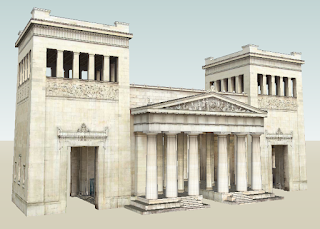
If you downlod this model into SketchUp, you'll see that it has 32 (!) scene tabs across the top. Click on each scene to see the view change. To play the animation, right-click on any scene tab and choose Play Animation (it's a little long, but worth it).
This model has it all: repeated components (to keep file size low), accurate sizes, and best of all, it's painted with digital photos of the actual building, both inside and out. The scenes guide you all over the model so you don't miss a single detail. It's quite a masterpiece.
The download options for this model include a KMZ download - this is Google Earth's file format. If you download and open the KMZ file, you'll see exactly where this model is on Earth (in Germany, actually).
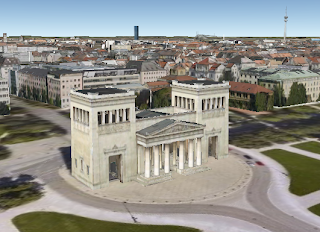
And here's something I just discovered: if a model has scenes, you can open the scenes within Google Earth. When you open a KMZ file, the model is placed under "Temporary Places." Under this, you can find a link for "Tour," and under this you can find each scene. Double-click a scene to open it. Way cool.
Anyone can design anything in 3D! www.3dvinci.net
However, I did run across this model, which is a great example of something to strive for when creating your own models. Click the picture below to link to the model's page in the 3D Warehouse.
If you downlod this model into SketchUp, you'll see that it has 32 (!) scene tabs across the top. Click on each scene to see the view change. To play the animation, right-click on any scene tab and choose Play Animation (it's a little long, but worth it).
This model has it all: repeated components (to keep file size low), accurate sizes, and best of all, it's painted with digital photos of the actual building, both inside and out. The scenes guide you all over the model so you don't miss a single detail. It's quite a masterpiece.
The download options for this model include a KMZ download - this is Google Earth's file format. If you download and open the KMZ file, you'll see exactly where this model is on Earth (in Germany, actually).

And here's something I just discovered: if a model has scenes, you can open the scenes within Google Earth. When you open a KMZ file, the model is placed under "Temporary Places." Under this, you can find a link for "Tour," and under this you can find each scene. Double-click a scene to open it. Way cool.
Anyone can design anything in 3D! www.3dvinci.net
Monday, March 23, 2009
Bridge Modeling Contest
Every few months, Google accounces a SketchUp design competition. My favrotite one (until now), was the Gingerbread Competetion.
Now they've announced a Bridge Modeling Competition for students, which is exciting for me for two reasons:
Anyone can design anything in 3D. www.3dvinci.net
Now they've announced a Bridge Modeling Competition for students, which is exciting for me for two reasons:
- I worked for about 8 years as a bridge engineer (design, inpsection, renovation)
- I'm a judge for this competition!
Anyone can design anything in 3D. www.3dvinci.net
Sketchy Physics
I really don't know much (yet) about Sketchy Physics. It's a plug-in for SketchUp, and according to the YouTube videos I've seen, enables you to do incredibly cool things. With the release of dynamic components in Version 7, you can do similar things with moving parts, but only Sketchy Physics seems to follow the laws of Newton.
For example, check out this video, which is about a year old:
When I get some free time (what's that?) I'd love to dive into this a little deeper, and maybe write some tutorials about how to start with some simple models. This seems like something every physics teacher should know about.
Anyone can design anything in 3D! www.3dvinci.net
For example, check out this video, which is about a year old:
When I get some free time (what's that?) I'd love to dive into this a little deeper, and maybe write some tutorials about how to start with some simple models. This seems like something every physics teacher should know about.
Anyone can design anything in 3D! www.3dvinci.net
Tuesday, March 10, 2009
Animation in Stages
Keeping with the theme of animations, one of my favorite presentation techniques is the staged animation you can create when you place section planes within groups or components.
The animation below is one I created for the Google SketchUp Cookbook, written for intermediate and advanced users.
You can download the SketchUp file for this model from the 3D Warehouse. Click through the scenes to see each part of the model grow or shrink.
Below is another one I like: it's an animation of building a car, containing view changes.
You can get this model here.
Anyone can design anything in 3D! www.3dvinci.net
The animation below is one I created for the Google SketchUp Cookbook, written for intermediate and advanced users.
You can download the SketchUp file for this model from the 3D Warehouse. Click through the scenes to see each part of the model grow or shrink.
Below is another one I like: it's an animation of building a car, containing view changes.
You can get this model here.
Anyone can design anything in 3D! www.3dvinci.net
Thursday, March 5, 2009
One trillion dollars - what does it look like?
I'm constantly surprised by the uses people find for SketchUp. This link
shows what one trillion dollars look like, in stacks of $100 bills.
http://www.pagetutor.com/trillion/index.html
Sang (the name of the person in the model) should grab that money and run. (Except that he could only carry a tiny fraction of it.)
shows what one trillion dollars look like, in stacks of $100 bills.
http://www.pagetutor.com/trillion/index.html
Sang (the name of the person in the model) should grab that money and run. (Except that he could only carry a tiny fraction of it.)
Wednesday, March 4, 2009
Animated Fractals
Looks like I'm into animation this week. I found this site that shows animations of fractals:
http://www.math.umd.edu/~wphooper/frac/
There are dozens of sites like these, but this one has nice, clear graphics. Animations like these can surprise a kid who thinks math is boring!
I dabbled a little in fractal animation myself. The movie below comes from one of the models detailed in my book: Star Fractals (part of the GeomeTricks series). You start with two stars, one "fat" and one "skinny," and create a few levels of fractals for both. Eventually the stars look the same, except for the tiny points at the ends.
http://www.math.umd.edu/~wphooper/frac/
There are dozens of sites like these, but this one has nice, clear graphics. Animations like these can surprise a kid who thinks math is boring!
I dabbled a little in fractal animation myself. The movie below comes from one of the models detailed in my book: Star Fractals (part of the GeomeTricks series). You start with two stars, one "fat" and one "skinny," and create a few levels of fractals for both. Eventually the stars look the same, except for the tiny points at the ends.
Tuesday, March 3, 2009
Animated Engines
If you've ever wondered what makes a car or machine run, check out this site:
Animated Engines
The animations of combustion, steam and stirling engines are really fun and interesting to watch, especially for anyone interested in mechanical engineering.
Matt Keveney, the site's creator, created schematic drawings of each engine using DesignCAD, made copies at set intervals to simulate the animation, exported each copy as a separate image, and combined the images into an animated .gif file. This page explains how he did it.
You can get similar models using Sketchy Physics, more on that later!
Animated Engines
The animations of combustion, steam and stirling engines are really fun and interesting to watch, especially for anyone interested in mechanical engineering.
Matt Keveney, the site's creator, created schematic drawings of each engine using DesignCAD, made copies at set intervals to simulate the animation, exported each copy as a separate image, and combined the images into an animated .gif file. This page explains how he did it.
You can get similar models using Sketchy Physics, more on that later!
Monday, March 2, 2009
Excellent Polyhedra Model
Go to this site: http://www.zebragraph.com/Site/Polyhedra%20Dome.html, and download the .skp model linked there. (This is a SketchUp file; if you need the application you can download it for free at http://www.sketchup.com/.)
This was a project by Jon Choate and his students at Groton School. (Jon is the co-author of my GeomeTricks books.)

The dome itself is a polyhedron, and you can take a tour inside to see many colorful polyhedra "sculptures" on display stands. To take the tour, just click the Scene tabs at the top of the SketchUp window. Very cool!
This was a project by Jon Choate and his students at Groton School. (Jon is the co-author of my GeomeTricks books.)

The dome itself is a polyhedron, and you can take a tour inside to see many colorful polyhedra "sculptures" on display stands. To take the tour, just click the Scene tabs at the top of the SketchUp window. Very cool!
SketchUp and Autism
I've known about SketchUp's Project Spectrum for a few years now, when Tom Wyman first spoke with me about his work with the Boulder Autism Society. Turns out that this application which was designed for architects somehow got a foothold with some autistic kids, who were able to communicate complex designs on the computer, even if they couldn't express their ideas verbally. Seems SketchUp mimics the way an autistic mind works, which was confirmed to me once by an overjoyed book customer who was thrilled to have discovered SketchUp.
And having a mildly autistic son myself (he's only 7), I've seen firsthand how SketchUp can bring out some inner creativity which might have otherwise been hard to tap. For a kid who has issues focusing, he can sit and design different houses for 30 minutes, without any fidgeting or redirecting.
Newsweek now has a piece on the SketchUp-autism relationship: http://www.newsweek.com/id/179952
And having a mildly autistic son myself (he's only 7), I've seen firsthand how SketchUp can bring out some inner creativity which might have otherwise been hard to tap. For a kid who has issues focusing, he can sit and design different houses for 30 minutes, without any fidgeting or redirecting.
Newsweek now has a piece on the SketchUp-autism relationship: http://www.newsweek.com/id/179952
Subscribe to:
Posts (Atom)
